Controls are visible in Beebom’s October 11 published game image. They were not operated in a live server by this wiki; mobile and console layouts remain untested.
How to redeem Huss Valley codes in the game
- Open Huss Valley by Huss Valley Official and wait for its interface to load.
- Open MENU. In the published image, the expanded menu includes SHOP, KNIVES, JOURNEY, SETTINGS and CODES.
- Select CODES, then enter one code in the ENTER CODE field. Copy the exact letters from the dated list; avoid adding a sentence or spaces.
- Select REDEEM and read the response before entering another code.
- Record any confirmation and compare your rewards or inventory with their previous state. A button press alone is not proof of a successful claim.
Finding the CODES button
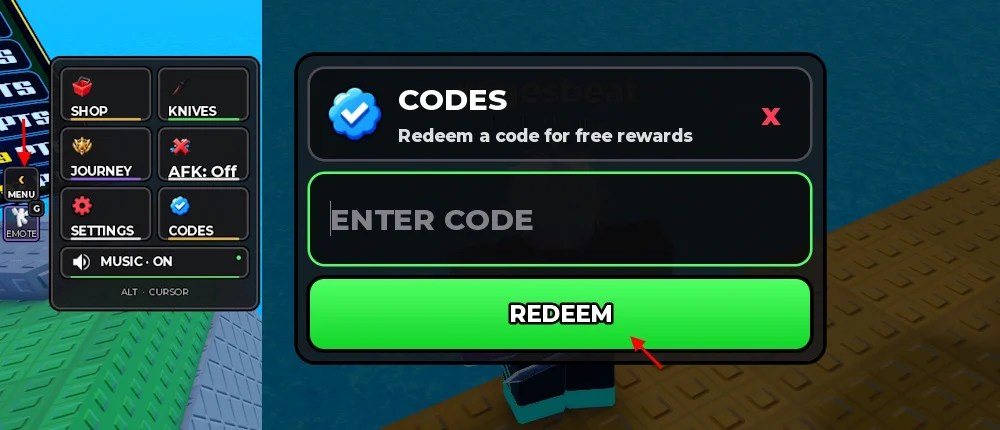
In the published image, CODES appears in the expanded menu beside SETTINGS and below KNIVES. The claim panel has a close control marked X, a text field and a large green REDEEM button.
Use the visible labels rather than looking for an assumed gift icon or a code box on the Roblox website. If your game has a different menu, first confirm its creator and Place ID. Interface position can change between devices or builds.
PC, phone and controller access
On PC, select the field before typing. The image also contains an ALT · CURSOR hint, but this wiki has not tested that binding in a current server.
On a phone, use the visible menu and text field if available. No mobile button position or controller binding is established by the inspected image. Do not treat the desktop image as a tested device-specific guide.
Check the result before trying again
A successful response, a balance change and a newly unlocked item are different observations. Record which one you actually see. If a response names a cosmetic, check the relevant collection instead of assuming it adds spendable currency.
If the panel rejects the entry or the reward is unclear, use the troubleshooting guide. Repeatedly pressing REDEEM does not supply evidence about an expiration date or account eligibility.
Questions before you play
Can I redeem Huss Valley codes on this website?
No. Claims take place in Roblox. This wiki has no account linking or redemption form.
Where is the CODES menu?
The published interface places CODES inside MENU, beside SETTINGS. The position in your current device or build may differ.
Are the mobile redemption controls tested?
No. The published image establishes labels, but this wiki has not tested a phone or controller claim.
Sources & review notes
Publication or inspection dates are listed for each source. Reading a source is different from testing a live game.
- Official Huss Valley experience Official · Checked 2026-10-11
Identity and published description; not a complete rulebook.
- Published Huss Valley redemption interface Published game screenshot · Report dated 2026-10-11
Inspected October 11: MENU includes CODES; the panel shows ENTER CODE and REDEEM. Current device layouts and successful claims were not tested.